
Live standings, as the games are played
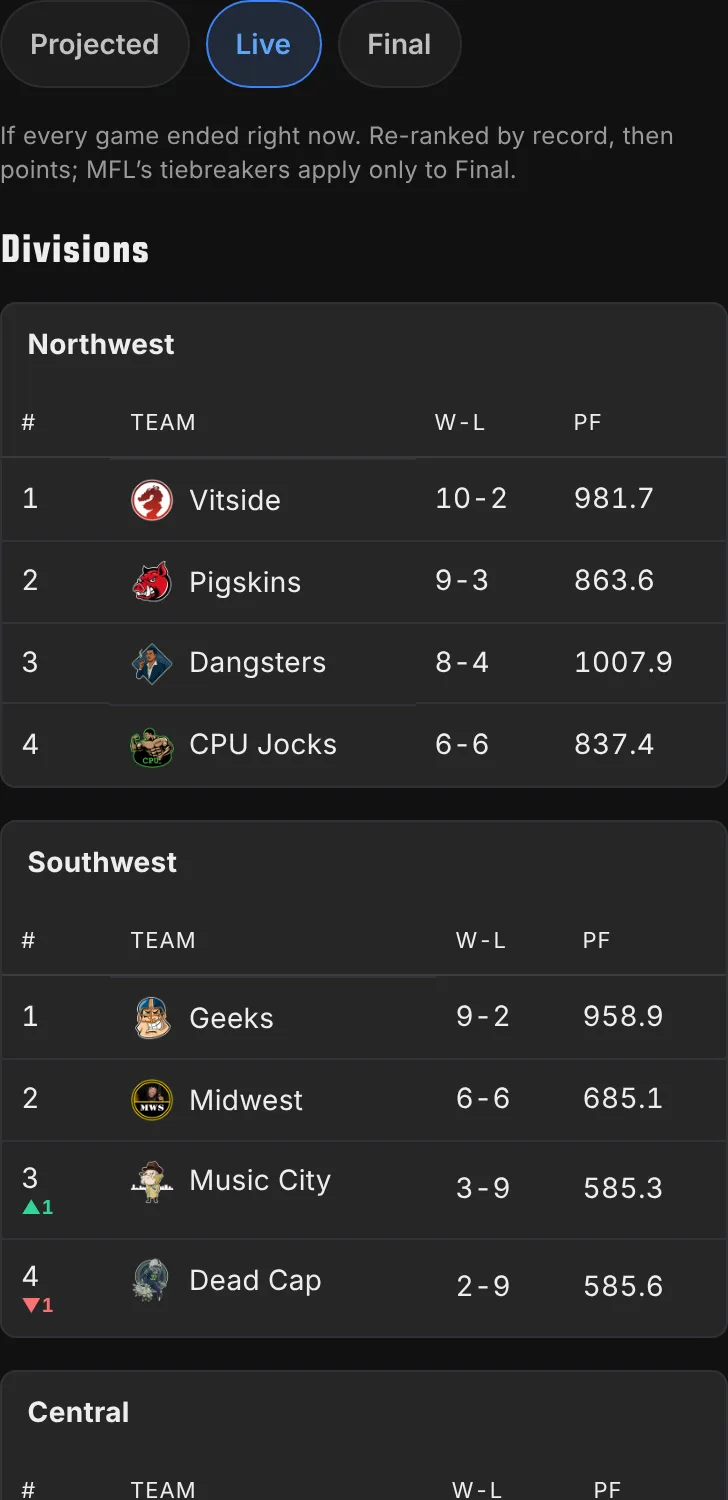
Live Scoring has a Standings tab. Every division re-ranks as the scores come in, with arrows for who is moving, and Projected shows where the week is heading if every game ends as projected.
The Full Story
New this week
- Mondays have a new homepage hero: Sunday's recap until 10am, then the closest game Monday night can still swing and the player who can swing it.
- On a phone, Free Agents now sorts like your roster: swipe the row of pills above the list and tap one to sort, tap again to flip it, and a third time to reset.
- New Tag History page under Contracts lists every franchise, transition and RFA tag since 2008, filterable by team, tag and player.
- The Gauntlet's new Schedule Swap shows your record with any other team's schedule: your scores, their opponents, doubleheaders included.
- The old message board is back as a members-only Forum Archive: search 19 years of posts, or ask Schefter what owners said.
- The Broadcast board now spotlights your players on the field between scores, with their points and box score: catches, yards, carries and touchdowns.
- Steer the Broadcast with your TV remote: Down pages through the bottom section, Up and OK feature one game's players, and Back returns to hands-free.
- A TV paired to your Broadcast can now open Live standings too, with no sign-in.
- The Saturday Matchup Preview now opens with a Game of the Week rivalry panel and gives every game a tale-of-the-tape card: records, streaks, recent results and the all-time series.
- Every Matchup Preview game card now shows a mini map of both teams' hometowns and how many miles apart they are.
- The Pecking Order now has a map: the top three at their hometowns, plus pills for the full order and the week's biggest climbers and fallers.
- Ask the History: ask stats questions about games, players, trades and drafts, keep asking follow-ups, and see what the league is asking this week on the History page.
- Rivalries redesigned: the hottest series as team-color cards, any team's rivals with a win bar each, and a head-to-head grid shaded by heat.
- Score overlay for the Google TV app: your matchup, win chance and lineups over YouTube TV, a thin score bar, and a Watch list that opens your players' games.
- MFL Live is now called MFL Football, on the website and in the Google TV app. Your /live links and the TV app you already have keep working. How to use it.
- Create a team logo: pick a style and one or two team colors, and MFL Football writes a prompt to paste into ChatGPT, Gemini or Claude. It lives at mfl.football/team-logo.
- The TV guide now covers every TV: Fire TV, Samsung, LG and Xbox through the browser at mfl.football/tv, and what to do on Roku and Apple TV. How to use it.
- The TV app's score overlay is now a see-through ticker at the top or bottom of the screen, with a banner for your starters' big plays and lineups one press away. How to use it.
- Set Lineup now shows each game's day and kickoff time, like "Sun 10:00 AM PT", on every lineup slot and in the replacement picker.
- The TV score overlay is now a small corner box with team logos and a win bar, grows for big plays, and can fill a multiview quarter from your phone. How to use it.
- Where to watch: the TV app lists every NFL game your starters are in, with the channel, and OK opens it in YouTube TV, Prime Video, Netflix or DAZN. How to use it.
- TheLeague has official championship pennants: each division leader on the homepage standings wears its division shield, and the champion's medallion hangs in the footer.
- Remote mode: the MFL Football TV app on an Android phone, or mfl.football/live/broadcast/remote on any phone, steers your TV's score box with big buttons. How to use it.
- Create a team logo now takes three team colors as well as two, and each style now says in plain words what it looks like.
- Team logo prompts now spot a nod to a real NFL player or team in your name and ask the AI to play it up, without copying their face or logo.
- Live Scoring now names a Player of the Week and the week's Nail-Biter, the closest game, every week. Holidays rename them.
- The player card's game log now colors each opponent by matchup, shades each week against the player's own average, and adds a Pos Rank tile.
- Live Scoring has a Standings tab: every division, updated live as games are played.
- Make a free season video at mfl.football/video for any team in your league: champion, mid-season report, mid or last place, in five looks, filled in from MFL, Sleeper or ESPN.
- League History pages now show owners as their team, like "Bring The Pain Owner", to anyone not signed in. Sign in to see real names. Visitors can also try Ask the History.
- Record Book: every record names the round, opponent and their score, this season's records wear a New badge, plus All-Play, luck and all-time standings.
- The phone TV remote opens right after you pair a TV, and it can pick which of your leagues the TV board and score overlay show.
- The phone TV remote can switch the score overlay off and back on mid-game, without reaching for the TV's own remote.
- The TV overlay's quarter-screen view splits "playing" per team, with a dot in each team's color, instead of one total for the matchup.
- The TV overlay's quarter-screen view shows each player's photo on their team's colors beside their name, like the player cells elsewhere.
- A big play on the TV overlay now takes over the score box, or the whole quarter view, at its own size: round player photo, name and points.
- Schefter now writes some moves as one-liners, posts injured reserve moves, and rolls a team's busy day into one roster list. Transaction cards drop the bold headline.
Fixes & polish
- Owners' Poll — The Pecking Order's chat post now waits until the new week is live on the site, so the link never opens last week's rankings.
- Schefter Report — The Gauntlet is now a quick read: the rankings chart sits at the top, followed by two short paragraphs on the hardest and easiest roads ahead.
- Franchise Pages — Team icons and banners show again on The League's 2011-2024 MFL season pages.
- Franchise Pages — Head-to-head records in matchup previews, the schedule release and the Owner Map now match the rivalry pages: current owners only, consolation games left out.
- Franchise Pages — Franchise page head-to-head rows now match the rivalry page they link to, and every win-loss bar in the list is the same width.
- Franchise Pages — Rivalry pages now name every playoff round they know, and the one AFL playoff tie MFL broke on its tiebreaker (2005, week 17) shows as the win and loss MFL recorded.
- Design System & Theming — Behind the scenes, badges and cards across the site now share one style kit. Nothing looks different today, but a fix to one now reaches every page.
- Design System & Theming — Pop-up windows now share one look: the same corners, shadow and dimmed background, in light and dark, from player cards to sign-in to the draft room.
- Design System & Theming — Tab bars now share one look: the same underline, type and highlight for the selected tab, from player cards to the schedule and draft room.
- Design System & Theming — Data tables now share one header row: the same small capitals and rule under them, across standings, rankings, front-office and history pages.
- Design System & Theming — Filter and sort pills now share the Rosters pill look everywhere, in one swipeable row on phones: What's New, Schefter, salary history, draft order and Live.
- Design System & Theming — More filter pills take the Rosters look in one swipeable row: Transactions, Top Players, Calendar, position filters, Search, Draft Results and Sunday Ticket.
- Design System & Theming — Card borders in dark mode are softer, so panels sit quietly on the page instead of outlining every box.
- Design System & Theming — Gray secondary text (timestamps, positions, labels, the trade offer sheet's Dismiss button) is darker in light mode and brighter in dark mode, so it is easy to read.
- Live Scoring — The Broadcast preview now carries a clear Open full broadcast button, so it's obvious one press opens the full board.
- Live Scoring — Before kickoff, MFL Football's Halloween header now shows its Monster of the Week and Scariest Game cards waiting for the first scores, instead of a blank space.
- Live Scoring — An open matchup on Live Scoring now shows each team's logo beside its name and score.
- Live Scoring — Tapping between MFL Football pages now shows a loading bar and dims the page right away, so a slow page like Live standings no longer looks like the tap didn't register.
- Live Scoring — In dark theme, Fire Ready Aim now shows as charcoal, close to its real black, instead of coral or pink, matching the TV broadcast.
- Live Scoring — The MFL Football home page now shows the Broadcast in real rooms: next to the game on a second TV, on a wall of TVs, and on a tablet.
- Live Scoring — In the Google TV app, the menu's sign-in now opens the phone QR code instead of a password form you'd type with the remote.
- Live Scoring — Turn the TV score overlay on from MFL Football itself: press Back on the board and pick top or bottom. Most Google TVs hid the separate Score overlay tile. How to use it.
- Live Scoring — The MFL Football TV and phone apps have a new icon: the MFL mark, big, with MFL.football underneath.
- Live Scoring — On the Broadcast page, switching a league on or off now updates the board in place: no page reload, and your TV remote stays on the league you pressed.
- Live Scoring — The phone TV remote now talks to the TV you paired most recently, and TVs with the same name show the day they were paired.
- Live Scoring — The TV score overlay's quarter-screen view shows the big-play alert again when one of your starters scores, instead of only lighting a dot.
- Live Scoring — Live Scoring no longer shows an inflated score for a few minutes when you open it mid-game; it waits for ESPN and MFL to agree before adding up the difference.
- Live Scoring — Live Scoring standings drop the points-for column so the table fits on a phone screen.
- Rosters — Top Players' Owner column now reads live rosters, so a player picked up today shows his new owner instead of reading as a free agent until the next day.
- Rosters — Past seasons on Rosters now show every player who finished the year on each team, and the Year picker sits behind the sliders button on a phone (new on TheLeague's page).
- Rosters — A player on another team no longer offers Simulate cut. His sheet shows Trade for him, Watch and the menu on one line.
- Standings — In the Christmas theme, the selected Standings, Playoffs and Draft view icons are red to match their tile, not blue.
- Navigation & Routing — Switching to Best Ball from a page it doesn't have, like standings, now opens the Best Ball home page instead of a 404.
Everything above shipped in the week of Oct 20-Nov 9. Older weeks are in the archive, and the how-to pages for each feature live in the guides.
Message